Posts

Collection of bad / confusing UI
Image
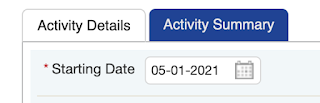
In this post I want to share some examples of UIs that I find really confusing. Maybe you'll agree or maybe you won't but I think it's still fun to show what I think is bad UI. It's probably going to be an ongoing post - because I always find sites that are confusing online. I won't tell which site it comes from so that we can keep them anonymous. I've wanted to write this post a while ago but never did. There's a saying that goes by "better now than never" 1.  This tab color is really strange to me. Which one is currently selected? Every time I use this, I end up clicking on "Activity Details" (light colored one) but that one is already selected. The one not selected is the one in dark blue. I don't think there's a right and wrong here but my brain cannot come to the conclusion that the light white background color is the selected one. More to come!

Git commands cheat sheet (in progress)

### Use case: Working on 2 dev branches and merging one into the other and want to revert git checkout dev_branch git merge my_new_feature // merging my branch into develop Ooops, now I realized `my_new_feature` has something wrong git revert -m 1 <sha of merged commit> OR git revert HEAD -m 1 means we keep the parent side of merge ( dev_branch  branch) ### Fetch their new commits and merge to your branch git fetch protected_repo Committed but not pushed to remote. Want to get rid of latest commit git reset --hard HEAD~1 Get a branch from a forked repo to your own repo (or to your own forked repo) git reset HEAD~1  Get a branch from a forked repo to your own repo (or to your own forked repo) git fetch git@github . com : theirusername / reponame . git theirbranch : ournameforbranch Associate your local copy to the upstream branch git remote add repo_name https://github.com/theirusername/their_repo.git Fetch their new commits and merge to your br...

Moving private repos to bitbucket

As much as like github for repos - I didn't feel it was *yet* worth to pay the monthly fee to get unlimited private repos. So I decided to move all my private repos to bitbucket, which is free! If you ever need to do the same, here's a link that explains it really well: http://befused.com/git/github-bitbucket-move

Chrome dev tools - secret weapon?

When I started working back in 2010, we used to support IE7. I still remember how much of a paint it was to debug javascript code. With IE8/IE9 debuggers, what I learned is patience, rather than figuring out how to fix all those weird bugs that *always show up *only in IE. The debuggers were so slow. Also back then, firebug was the norm. Chrome dev tools was relatively new and most people I knew did not use it. I liked Chrome so I sticked with it. Now, it's a tool that I use almost every day. In fact, I try to spend some time and follow what's new with the dev tools. I also spend some time experimenting with soon to be features/apis on Chrome Canary. This year, well last year... (2016), I've been pretty busy and haven't had much time to look at the new features. But today, I spent a few hours catching up on the last Google I/O and watch what's new with the dev tools. I wanted to share this link and give back some love to the chrome dev tools by writing this post. ...

css position: sticky

This links highlights what's new in Chrome 56: https://developers.google.com/web/updates/2017/01/nic56?utm_source=frontendfocus&utm_medium=email One cool thing amongst others (bluetooth access is also cool but this one css feature is something I wish we had a while back) is position:sticky . It's available in Chrome 56 (stable as of Jan 2017) and to summarize, it allows to fix an element into the viewport when it's within a threshold. .header {  // Element will be "fixed" when it is 10px from the top of the viewport  position:sticky;  top: 10px } You could set top : 0; to make it stick directly to the top of the viewport. Have to be conscious that this positioning might not be available in other browsers as of yet. There's this site I use to check what's available: http://caniuse.com/#search=sticky As of now, it's not available in IE (not very surprising...)

Git bisect

Ever used git bisect?! https://www.metaltoad.com/blog/beginners-guide-git-bisect-process-elimination

async promises in a sync way?

This blog post title is pretty confusing - but if you get to read this blog post by Google, it actually makes sense. It's actually pretty cool. Not that I don't like callbacks or promises, but I can see this being useful in more complex examples. async function fetchDogPics(url) {   try {     //this looks synchronous but it isn't...     const response = await fetch(url);     await response.text();   } catch (err) {     console.log('failed', err);   } }

Enums in Javascript

Found this tiny library that implements Enums in JavaScript: https://github.com/rauschma/enumify npm install enumify

Babel syntax highlighting for Sublime 3

In case you are looking for an ES6 syntax highlighting in sublime, check the babel-sublime project. Here it is:  babel-sublime

Looking into ES6

I'm starting to look at ES6 and here's one post that I found useful for converting react.js components to ES6. http://www.tamas.io/react-with-es6/

Gentle intro to maintaining CSS with Webpack

Found a gentle intro on how to maintain CSS with Webpack (targeted at React.js). Check it out ! http://bensmithett.com/smarter-css-builds-with-webpack/

One more webpack - react.js tutorial

Very basic tutorial on setting up webpack for react.js with hot reload. All the good things! https://robots.thoughtbot.com/setting-up-webpack-for-react-and-hot-module-replacement

Heroku setup for webpack

I'm looking into webpack for react and trying to setup a small project on heroku: Here's a tutorial I want to follow: http://ditrospecta.com/javascript/react/es6/webpack/heroku/2015/08/08/deploying-react-webpack-heroku.html Another well explained tutorial: http://www.christianalfoni.com/articles/2015_04_19_The-ultimate-webpack-setup and a bootstrap project: https://github.com/cgreening/simple-webpack-react-starter/blob/master/package.json

React.js and Flexbox links I want to look at when I have time

1.  A set of React components implementing flexboxgrid with the power of CSS Modules https://github.com/roylee0704/react-flexbox-grid?utm_source=html5weekly&utm_medium=email 2. Grid, Flexbox tutorial https://24ways.org/2015/grid-flexbox-box-alignment-our-new-system-for-layout/ 3. Grid by examples: http://gridbyexample.com/

React.js tutorial code on github

I've been watching and following a few tutorials about React.js during my free time, mostly for fun and also for work and I thought that I would share the code of the examples, since they are pretty much self-explanatory and might be good examples to bootstrap new projects, i.e.: react-router and reflex examples... It's also easier for me to track changes so here you go, https://github.com/davidlygagnon/react.js-tutorials .

HTML5 Dev Conf 2015 - San Francisco

I attended the first day of the conference this year. I didn't take that much notes but here it is in case your interested: Design and Performance by Steve Souders Slides at:  http://stevesouders.com/ - May be useful to do prototyping early instead of just getting mock ups from UX - W3C Web timing specs      Navigation Timing           overall page metrics: performance.timing, now()      Resource Timing           individual HTTP requests                performance.getEntries()      User Timing           performance.mark, performance.measure - Example about image display time to load      add performance.measure in two places and take the max(): one on the image unload attribute and the other one at the bottom of the page. Michael Jackson - React Router dev contributor Must...

Fitbit API !

I recently bought a Fitbit scale and spent a few hours trying their APIs. At the same time, I decided to open source the code I wrote. It's basically a Fitbit client library to talk to Fitbit. Github repo of Fitbit-node It's still a work in progress but the library is available as of now. It's not a lot of code and I am using npm package: OAuth. When I get a chance, I'm going to add an example on how to use it.

ReactJS Conference Jan 28-29 at Facebook

I hadn't a chance to go to this Conference. It was at FB headquarters. Instead, I watched a few videos of the conference they posted online: http://conf.reactjs.com/schedule.html The keynote is pretty interesting. Tom Occhino talks about the history of React and how it was first introduced.

Google Chrome Summit Happening now !

Watch it live at : https://developer.chrome.com/devsummit/

Simple tutorial on React.js

Just found a simple introductory tutorial on React.js. On my todo list! Learning React.js: Getting Started and Concepts